Industry
Smart cities and traffic
Used with number-plate recognition and crowd analytics in safe-city surveillance.
Face recognition and watchlists
Face Recognition detects faces on the cameras you already have and matches them in real time against staff, VIP and watchlist databases. A watchlist match alerts operators.
For security and operations teams that need to know when a known person appears on camera.
Face Recognition detects faces in live video and matches them in real time against the databases you keep. These can be staff or VIP databases, or a watchlist of people your security team needs to know about. A watchlist is sometimes called a blacklist.
When a face matches a watchlist entry, operators get an alert in real time. The alert carries a snapshot from the camera and a match percentage.
It works on video from the CCTV cameras you already have. Face Recognition is also one of the AI Video Analytics modules. It shares their per-camera tuning and alert routing.
Face recognition alerts arrive on the alert wall, one of the views in the product interface.
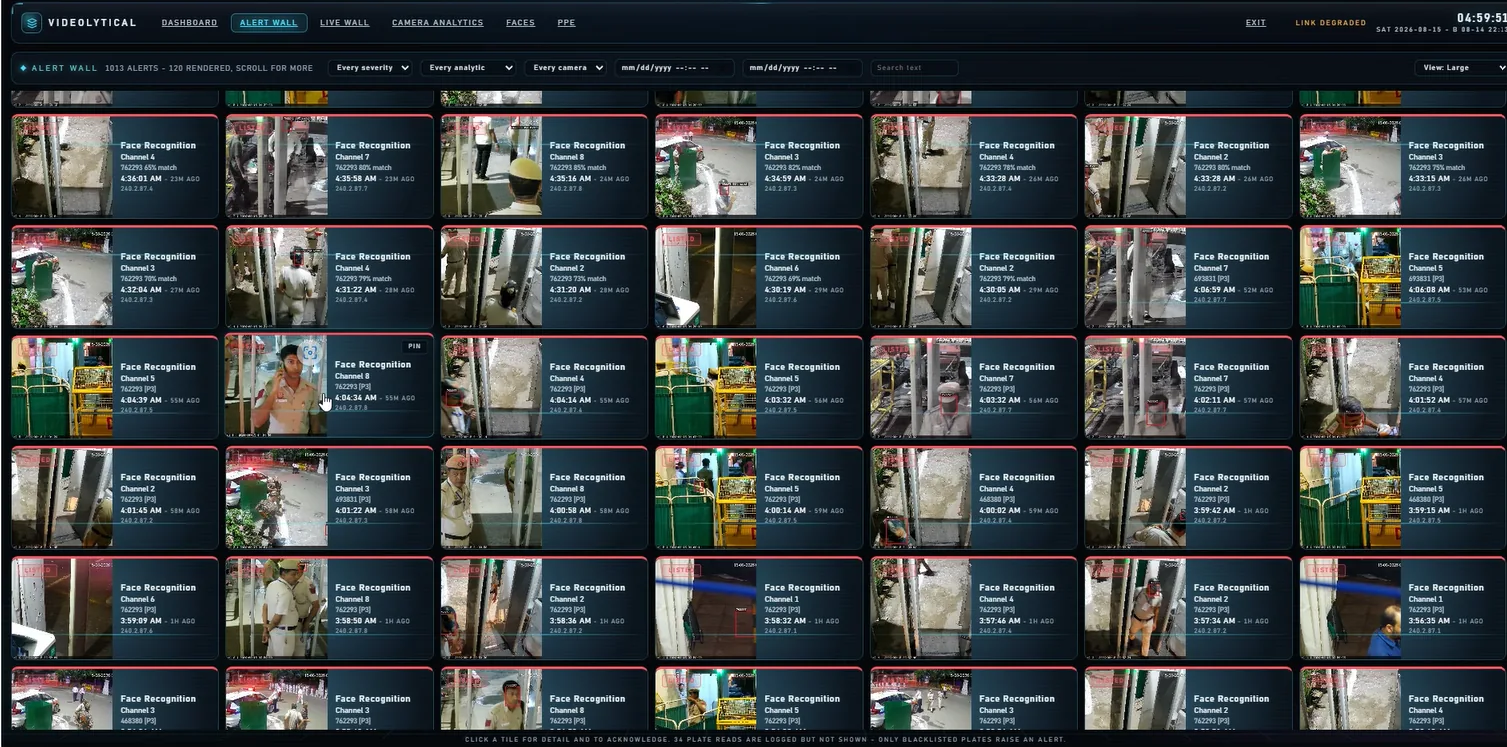
Each alert is a tile on the wall. A tile shows a snapshot from the camera, the name of the analytic, the camera channel, a match percentage and the time.
The software does the first step. People do the rest, following your own operating procedure.
A camera sees a face that matches a list entry. A tile appears on the alert wall.
Clicking the tile opens the alert in detail. The camera channel and the time say where and when the face was seen.
The match percentage is a guide, not a verdict. A trained person checks the snapshot against the list entry, then confirms the match or rejects it.
The operator acknowledges the alert. If your procedure calls for it, the alert is escalated. Alerts and operator actions are written to the audit trail.
Face recognition handles personal data. How it is used is decided by the organisation that operates it.
The software raises alerts. It does not decide who is on a list or what happens after a match. Settle these points before the first camera goes live.
Two platform features support these decisions: role-based access for each camera and function, and an audit trail of alerts and operator actions. Our guide, Face recognition: questions to settle before deployment, covers each point. It is general guidance, not legal advice.
A match is a lead, not proof
A match means the software found a close resemblance between a face on camera and a list entry. It does not prove who the person is. A trained person should confirm each match before anyone acts on it.
Face Recognition runs on the three deployment options of the platform. They can be mixed in one estate. Hardware is sized during the site survey.
| Deployment | Where it runs | What it offers |
|---|---|---|
| Edge | Camera or edge box | Keeps working without connectivity |
| On-premise | GPU servers at your site | Video stays inside your network. Suits air-gapped sites. |
| Cloud | Cloud instances | Central dashboards, updates and storage for multi-site estates |
Face Recognition uses the same connections as the rest of the platform, for video in and alerts out.
Face recognition is one of the analytics modules in use in these sectors.
Industry
Used with number-plate recognition and crowd analytics in safe-city surveillance.
Industry
Face watchlists for sensitive sites. The software can run on air-gapped networks.
Industry
Used with heatmaps, people counting and loitering detection in stores and malls.
Guide
The decisions to make before face recognition goes live, from purpose and watchlist rules to review and retention.
Datasheet
Face detection and real-time matching against staff, VIP and watchlist databases, on video from existing cameras. It runs at the edge, on-premise or in the cloud.
| Product | Face Recognition, also one of the AI Video Analytics modules |
|---|---|
| Detection | Faces in live video from each camera |
| Matching | Real-time matching against staff, VIP and watchlist (blacklist) databases. Staff, visitor and watchlist databases are managed in the software. |
| Demographics | Age and gender estimates for analytics |
| Alerts | Alert wall tiles with camera snapshot, analytic name, camera channel, match percentage and time. Alerts are acknowledged from the tile detail. |
| Alert filters | Severity, analytic, camera and date. Text search. |
| Interface views | Dashboard, Alert Wall, Live Wall, Camera Analytics, Faces, PPE |
| Alert routing | VMS console, SMS, email or webhook, with escalation rules and schedules |
| Tuning | Zones, schedules and confidence thresholds for each camera |
| Camera support | Existing IP cameras and network video recorders over ONVIF and RTSP |
| Deployment | Edge devices, on-premise GPU servers or cloud instances. Options can be mixed in one estate. |
| Integration | REST API and webhooks. Bridge into an existing VMS or command-centre console. AD or LDAP sign-on. |
| Security | TLS-encrypted streams and APIs. Role-based access for each camera and function. Audit trail of alerts and operator actions. Signed model and software updates. |
| Sizing | Hardware and network sizing are determined during the site survey |
Videolytical Systems Pvt. Ltd., 277, C Block, Sector 63, Noida, Uttar Pradesh, India. Sales and demos: sales@videolytical.com, +91 97160 05441.
Usually not. Face Recognition works on video from existing IP cameras and recorders over ONVIF and RTSP. Whether a camera suits face recognition depends on its position, the lighting and how large faces appear. The site survey and camera audit look at this.
Yes. On edge devices and on-premise servers, detection and alerts do not depend on a cloud connection. Air-gapped sites are updated with signed offline packages.
That depends on the deployment you choose. With on-premise servers, video stays inside your network. Cloud deployment is an option for multi-site estates, not a requirement.
A single figure would not tell you much. Results depend on camera angle, lighting, the size of the face in the picture and the quality of the photos in your database. The useful test is your own footage: a live demo, a sample clip or a pilot on a small set of cameras.
Videolytical delivers with camera and hardware makers (OEMs), security solution providers and system integrators. Delivery includes testing and calibration, and optimisation continues after handover. The software is engineered and supported from Noida, India.
Arrange a live demo, send a sample clip, or ask for an architecture and sizing discussion for your site.